
Use Thirdfy with Grok Bot
Let Grok Bot work with your Thirdfy agent. Add the Thirdfy connector once, then hand Grok Bot tasks like checking venues, scanning tokens and preparing trades, and it comes back with finished work.
Grok Bot is xAI's agent that works on its own: you hand it a task, and it comes back with the work done. With Thirdfy connected, that work can include your agent's markets, venues and trades, within the limits you set.
What you need
- A Grok plan that includes Grok Bot (Premium at the time of writing).
- A Thirdfy account. You can create it while you connect.
- Funds in your agent's wallet, if you want Grok Bot to trade. It can read and prepare without them.
1. Add Thirdfy as a connector
Grok Bot uses the connectors you add in Grok. If you already added Thirdfy for Grok chat, skip to step 2.
- Open grok.com/connectors.
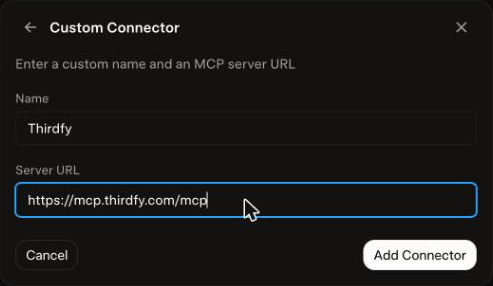
- Click New Connector, then Custom.
- Name it
Thirdfy, pastehttps://mcp.thirdfy.com/mcpas the Server URL, and click Add Connector.
Screenshots of every step: Use Thirdfy in Grok.
2. Choose how Grok Bot signs in
Grok Bot works without you watching, so pick how much it may do on its own:
| Way | How | What Grok Bot can do |
|---|---|---|
| Sign in with Thirdfy (recommended to start) | Complete the Thirdfy sign-in pop-up. Pick your agent and choose Read, and Trade if you want it to trade | Read anything. Each trade asks you to confirm before it runs |
| Agent key as a Bot secret | If Grok Bot asks for a secret or header, store Authorization: Bearer agent-... with your agent API key | Read and trade in one step, inside the agent's limits, without asking you each time |
Get an agent key with thirdfy-agent login email or email onboarding. See Agent CLI authentication.
3. Give Grok Bot a task
Tell Grok Bot what you want done, and start with "Using Thirdfy" so it picks the right tools:
Grok Bot works through the steps and returns the results.
What happens before every trade
- Your agent's limits apply. Per-trade and daily limits, and the actions you allow, are checked on every trade, whoever asks.
- Signed in with Thirdfy: each trade stops for your confirmation before it runs.
- With an agent key: trades run in one step, so the limits are your guard. Keep them tight.
- See or end access at auth.thirdfy.com/connections. To stop an agent key, rotate it with
thirdfy-agent agent key rotate.
If something goes wrong
| What you see | What to do |
|---|---|
| Grok Bot doesn't use Thirdfy | Check that Thirdfy shows under Connected at grok.com/connectors, and start your task with "Using Thirdfy" |
| Connection failed after you sign in | Allow pop-ups for grok.com and connect again |
| A trade asks you to sign in again | You granted Read only. Sign in again and tick Trade |
401 Authentication required with a key | The secret must be the full header value, Bearer agent-..., with your current key |
| A trade is refused | It's outside your agent's limits or allowlist, or the venue isn't ready. Ask Grok Bot to check readiness first |