
Trade Solana with Claude
Swap on Jupiter, earn in Kamino vaults and stake SOL from Claude. Connect Thirdfy once, fund your agent's Solana wallet, then ask in plain words.
Talk to Claude, and your agent trades on Solana. Connect Thirdfy to claude.ai once, fund your agent's Solana wallet with USDC, then ask in plain words. You can swap on Jupiter, earn in Kamino vaults, provide liquidity on Meteora, or stake SOL. Claude shows you each trade first and runs it only when you confirm.
This is Solana mainnet with real funds. Start small. Your agent's limits apply to every trade.
What you need
- A Claude plan with custom connectors (Free, Pro, Max, Team or Enterprise).
- A Thirdfy account. You can create it while you connect.
- USDC on Solana for your agent to trade with. Thirdfy pays the Solana network fees.
1. Connect Thirdfy to Claude
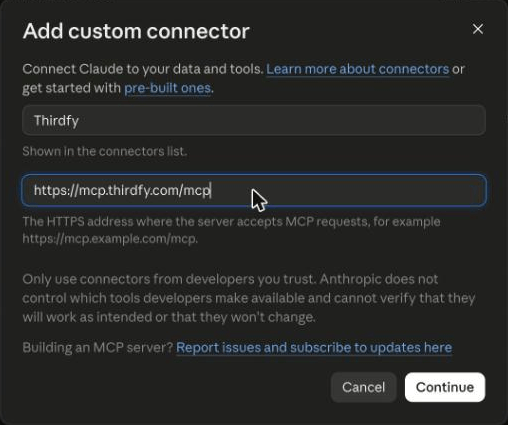
In claude.ai, open Customize → Connectors, click + Add, then Add custom connector. Name it Thirdfy, paste https://mcp.thirdfy.com/mcp, click Continue, then Add, then Connect.
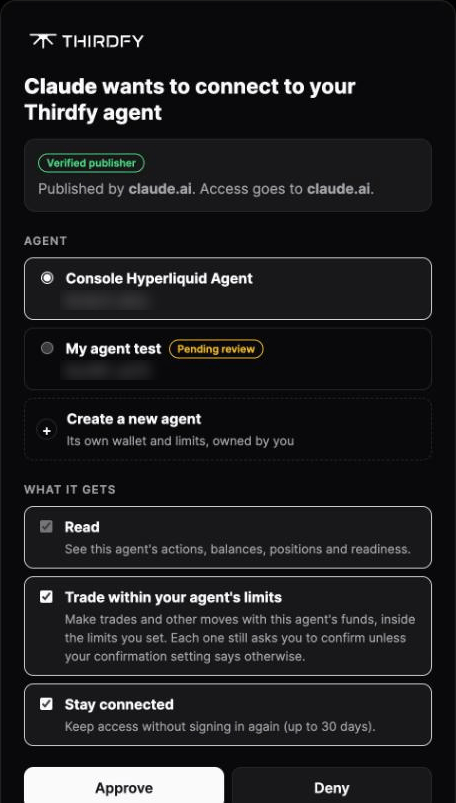
On the Thirdfy sign-in page, pick your agent (or create one), tick Trade within your agent's limits, and click Approve.
Each step with screenshots: Claude connector guide.
2. Look before you trade
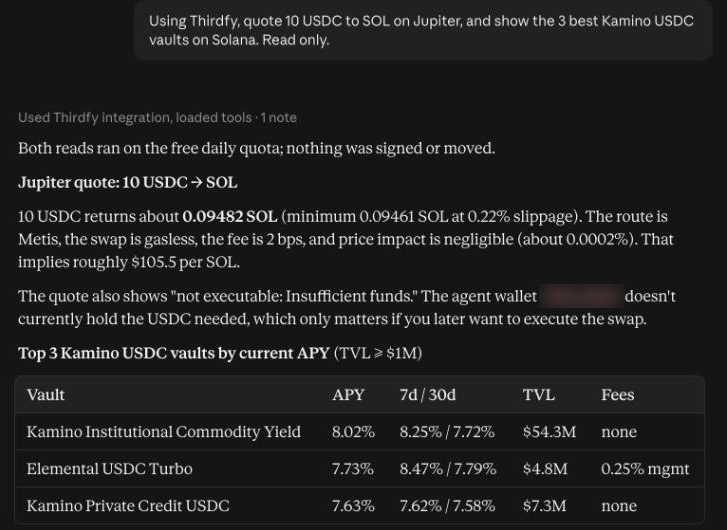
Quotes and vault lists are read-only, so you can try them before you fund anything:
Claude returns the Jupiter route and price, and a table of vaults with APY, size and fees:
3. Fund your agent's Solana wallet
Your agent has its own Solana wallet, separate from its Base or Ethereum address. Ask for it:
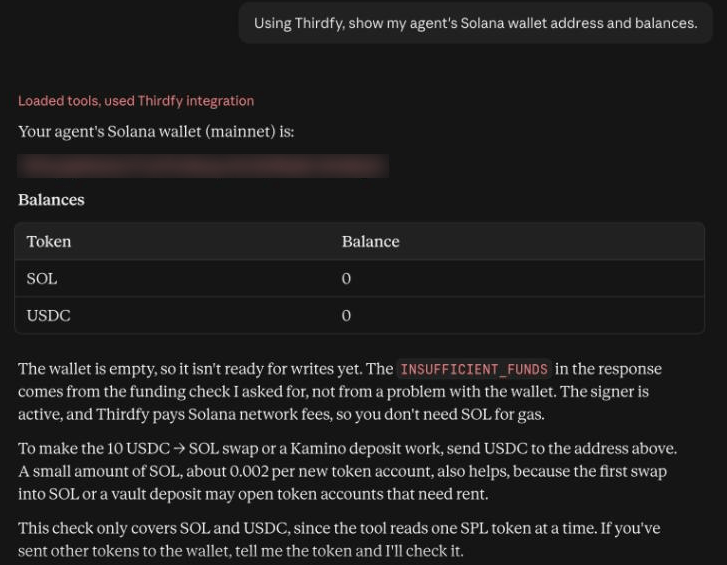
Send USDC on Solana to that address, plus a little SOL (about 0.02) for the small refundable deposits Solana charges when the wallet holds a new token. Copy and paste the address. Solana addresses are case-sensitive.
4. Trade, earn and stake
Before each trade, Claude previews it. You see the trade, its value and your limits on an order card. Click Place order, then Confirm order to run it, or Cancel to stop. Nothing moves until you confirm. The confirmation flow with screenshots: Trade DogeOS with Claude.
If something goes wrong
| What you see | What to do |
|---|---|
| Not enough funds | Send USDC on Solana to the agent's Solana address, not its Base address |
| Not enough SOL | Send about 0.02 SOL for token-account deposits |
| A token isn't found or is ambiguous | Paste the token's mint address. Thirdfy only trades tokens Jupiter has verified |
| Claude asks you to sign in again before a trade | You granted Read only. Sign in again and tick Trade |
Learn more
- Solana: wallet, fees and safety
- Jupiter, Kamino, Meteora, SOL staking