
Trade DogeOS with Claude
Trade on DogeOS from Claude. Connect Thirdfy to claude.ai, fund your agent with test DOGE, then swap on Barkswap, buy and launch tokens on Laika, and find trending tokens, all in plain words.
Talk to Claude, and your agent trades on DogeOS. Connect Thirdfy to claude.ai once. Then ask in plain words: swap DOGE on Barkswap, buy a new token on Laika, launch your own, or find what's trending. Claude shows you each trade first and runs it only when you say yes.
DogeOS Chikyu testnet. Everything here runs on the DogeOS testnet (chain 6281971) with free test DOGE from the DogeOS faucet. No real money moves.
What you need
- A Claude plan with custom connectors (Free, Pro, Max, Team or Enterprise).
- A Thirdfy account. You can create it while you connect.
- Test DOGE from the DogeOS faucet. Your agent pays its own gas on DogeOS, in DOGE.
1. Add Thirdfy to Claude
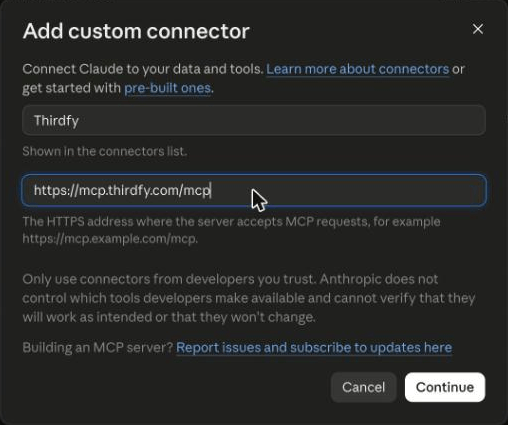
In claude.ai, open Customize → Connectors. Click + Add, then Add custom connector.

Name it Thirdfy, paste https://mcp.thirdfy.com/mcp as the URL, and click Continue.
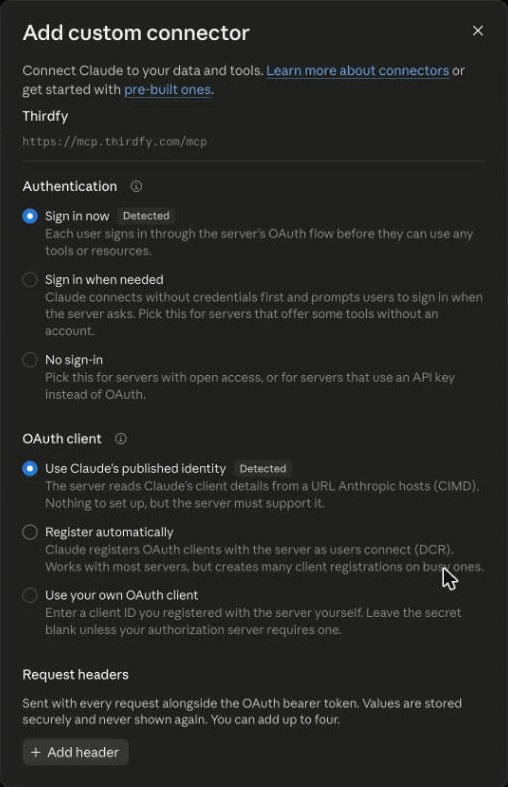
Claude detects that Thirdfy uses sign-in. Leave Sign in now and Use Claude's published identity as they are and click Add.
2. Sign in and pick your agent
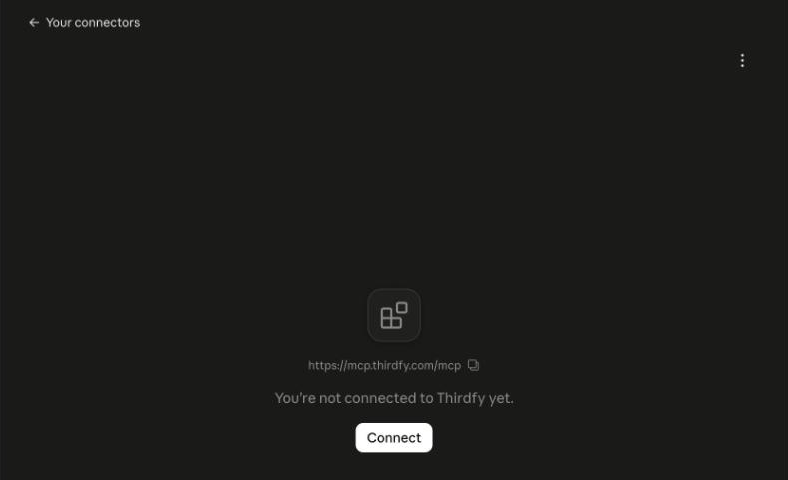
Click Connect. Claude opens the Thirdfy sign-in page.
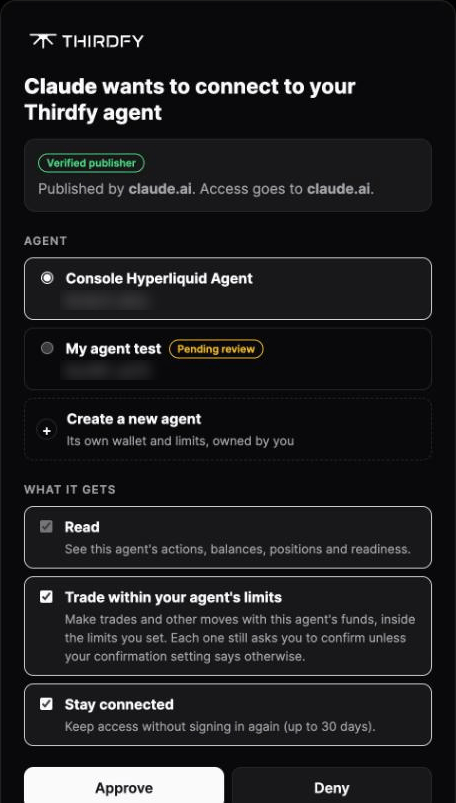
Sign in with email, Google or a wallet. Then:
- Pick your agent, or click Create a new agent and give it a name. Each agent has its own wallet.
- Tick Trade within your agent's limits so Claude can swap and buy on DogeOS. Without it Claude can only look, and it asks you to sign in again before its first trade.
- Keep Stay connected on if you don't want to sign in again for 30 days.
- Click Approve.
You're back in Claude with Connected to Thirdfy. Each Thirdfy tool is set to Needs approval, so Claude asks before it uses one.
3. Fund your agent with test DOGE
Your agent trades from its own wallet, and on DogeOS that wallet pays gas in DOGE. Ask Claude for the address:
Claude checks the wallet and tells you its address, its DOGE and token balances, and whether it has enough DOGE for gas. Open the DogeOS faucet, send test DOGE to that address, then ask again until it says ready.
4. Trade on DogeOS
Ask in plain words. Claude finds the right Thirdfy action, shows you what it will do, and runs it after you approve.
Find tokens
Claude reads Laika's live feeds: name, price, 24h volume and market cap for each token.
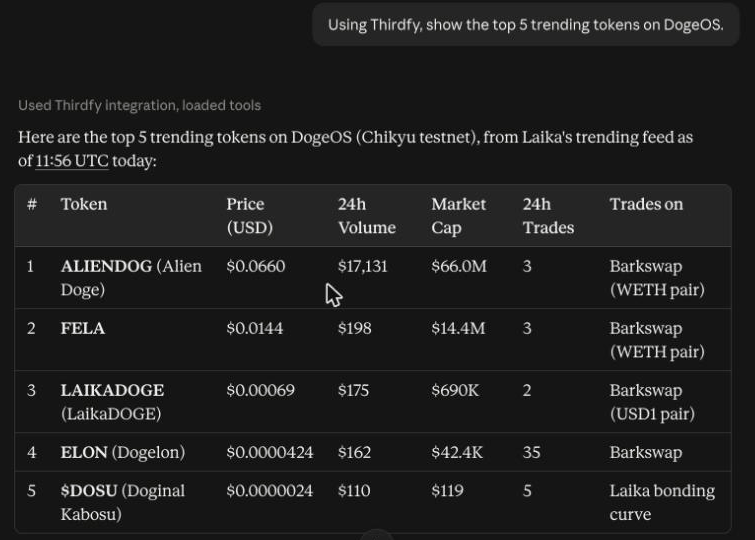
You can also ask for new tokens, early-bird tokens (not yet community-validated), big wins (strongest gainers) or only-moon tokens (recent large buys), or for tokens similar to one you like.
Swap on Barkswap
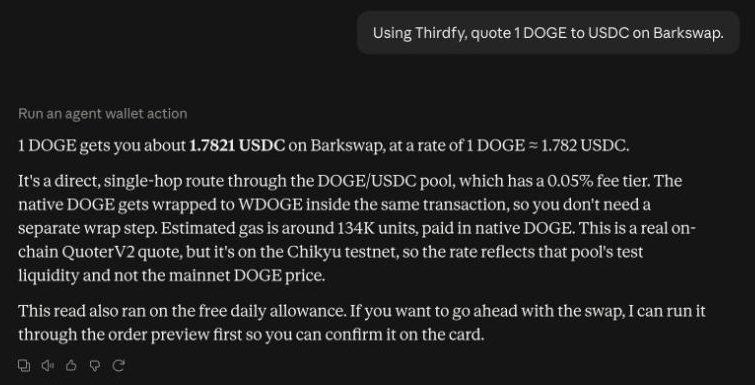
Barkswap is DogeOS's DEX. Use token names (DOGE, WDOGE, USDC, USDT, BARK, WETH) or paste a token address. When there's no direct pool, Thirdfy routes through a second token for you. When you spend DOGE, Thirdfy keeps a little back for gas.
Buy a token on Laika
Laika is DogeOS's token launchpad. Claude finds the token, checks its price and buys it with DOGE from your agent's wallet. To sell later:
Launch your own token
Only a name and a symbol are needed. You can add a description, an image and links. Claude prepares the launch, shows you the details and fees, and launches it after you approve.
Wrap and unwrap DOGE
Some pools trade WDOGE, the token version of DOGE. Claude can wrap DOGE into WDOGE and unwrap it back.
Preview, then confirm
Before a trade, Claude previews it with Thirdfy. Nothing is signed or sent. You see exactly what Claude asks for:
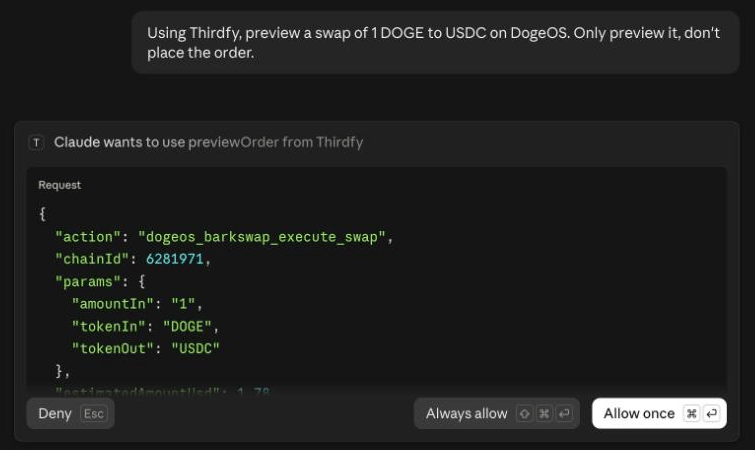
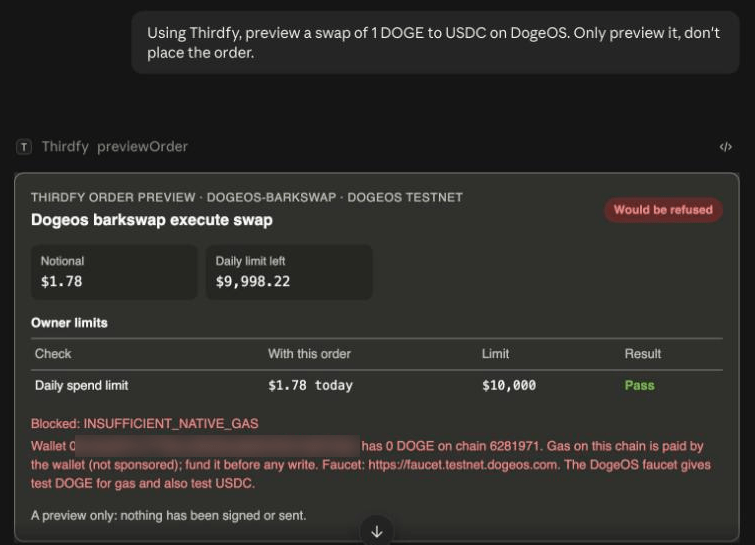
The preview shows the trade, its value, your limits and whether Thirdfy would run it. If something is missing, it says so before anything moves. Here the agent's wallet has no DOGE for gas yet, so the swap would be refused, and the card says how to fix it:
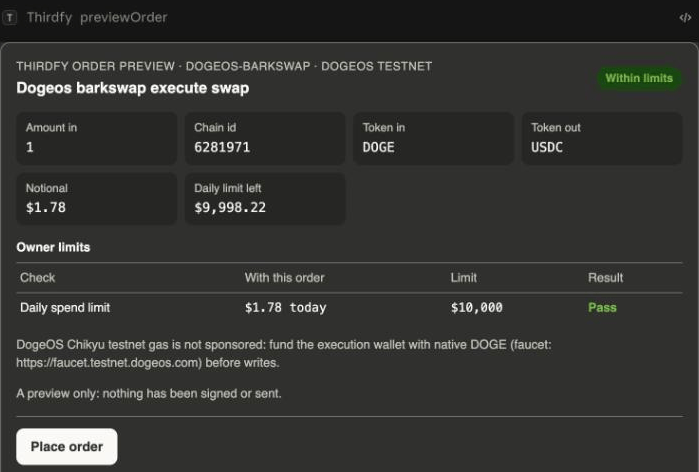
With DOGE in the wallet, the same preview passes. The card says Within limits and shows Place order:
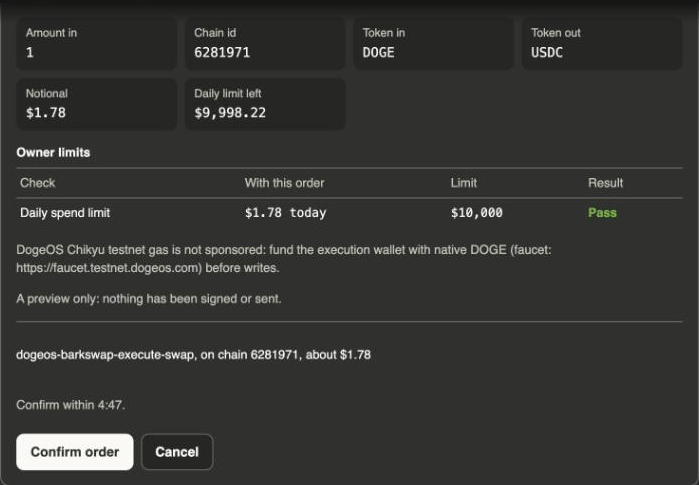
Click Place order, and the card asks you to confirm the exact trade within 5 minutes. Confirm order sends it. Cancel stops it.
If you cancel, nothing is sent:

Claude never places a trade on its own. You place it from the card and confirm it there, or say yes when Claude asks.
What happens before every trade
- You see it first. Claude shows the trade and asks you to approve it before it runs.
- Your agent's limits apply. Per-trade and daily limits, and the actions you allow, are checked on every trade. Anything outside them is refused.
- Gas stays covered. On swaps and wraps, Thirdfy keeps enough DOGE back for gas and refuses a trade that would leave too little.
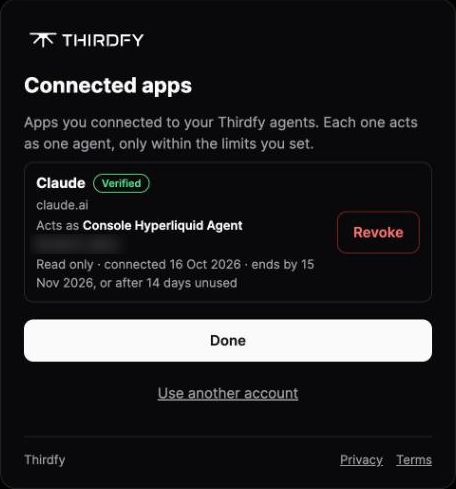
To see or end Claude's access, open auth.thirdfy.com/connections and click Revoke.
If something goes wrong
| What you see | What to do |
|---|---|
| The wallet isn't ready, or there isn't enough DOGE for gas | Send test DOGE from the faucet to the agent's wallet address |
| Claude asks you to sign in again before a trade | You granted Read only. Sign in again and tick Trade |
| An action is not allowed for this agent | Your agent has an action allowlist without the DogeOS actions. Allow them for the agent, or pick another agent |
| Claude can't find a token | Paste the token's address, or ask for trending or new tokens first |
| Claude doesn't use Thirdfy | Start your message with "Using Thirdfy", and check that Thirdfy is on under + → Connectors |
For developers
| Chain | DogeOS Chikyu testnet, chainId 6281971 |
| Gas | Native DOGE, paid by the agent wallet (not sponsored) |
| WDOGE | 0xF6BDB158A5ddF77F1B83bC9074F6a472c58D78aE |
| USDC | 0xD19d2Ffb1c284668b7AFe72cddae1BAF3Bc03925 |
| Providers | dogeos-barkswap, dogeos-laika, dogeos-ecosystem |
| Action | What it does |
|---|---|
dogeos_get_wallet_actionability | Wallet address, balances and gas readiness |
dogeos_get_trending_tokens, dogeos_get_new_tokens, dogeos_get_early_bird_tokens, dogeos_get_big_wins_tokens, dogeos_get_only_moon_tokens, dogeos_get_related_tokens | Token discovery |
dogeos_prepare_trade, dogeos_barkswap_get_quote, dogeos_barkswap_execute_swap | Barkswap swaps (tokenIn, tokenOut, amountIn in token units) |
dogeos_laika_token_state, dogeos_laika_buy_token, dogeos_laika_sell_token, dogeos_laika_claim | Laika tokens |
dogeos_prepare_token_launch, dogeos_laika_launch_token | Launch a token |
dogeos_wrap_doge, dogeos_unwrap_wdoge | DOGE ↔ WDOGE |
Over MCP, Claude calls these through walletExecute with chainId: 6281971. The same actions work from the Agent CLI: